How I (almost) closed my League of Legends account using pandas.
I have a love-hate relationship with League of Legends: I enjoy the universe created around the game but the game itself became not enjoyable due to bad gameplay decisions and an unpunished toxic community. So I decided to deactivate my Riot Account instead of deleting it because I would probably reopen it if their Untitled MMORPG catches my attention at launch (and this account is 10+ years old, so it brings a little nostalgia).
The account deactivation process is... bad. It requires a support ticket and an ownership verification which consists of a questionnaire asking for data related to your account and it's activity, questions like:
- When was the last time you bought RP (Riot Points, their in-game currency)?
- When did you received a gift from a friend?
- When and where did you created this account?
The answers of those should be easy to answer but not for me as I didn't spent too much money on the game and I didn't remember exactly when I opened the account (it was opened when the game opened it's beta to the public). This lack of data lead to another, more thorough, questionnaire with more detailed questions that was impossible for me to answer with the data I had available at the moment (i.e. what I remembered about my account).
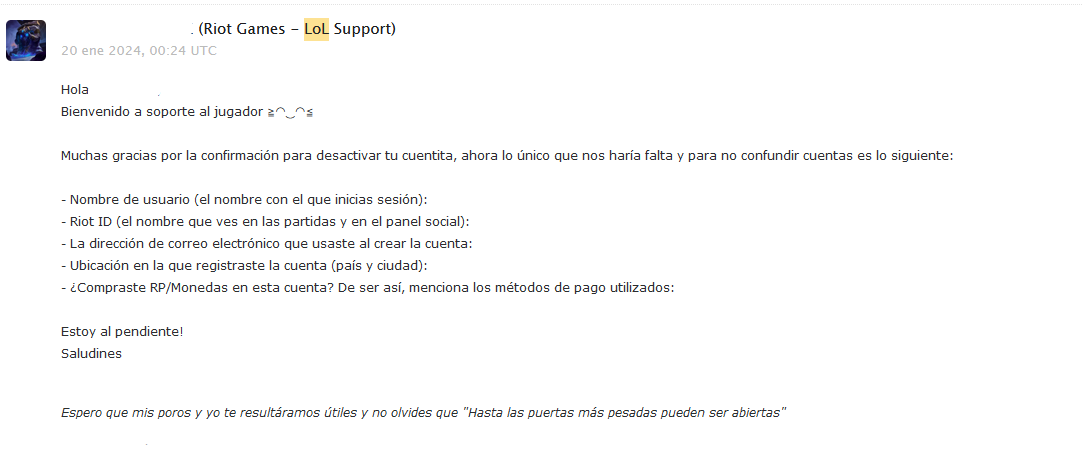
This is a sample of the ownership questionnaire Riot Games player support sends you, this can be translated as:
Hi. Welcome to player support (a kaomoji I cannot replicate in my keyboard).
Thanks for your confirmation to deactivate your teeny-tiny-account (lit. little account), now the only thing we need to not be confused with other accounts is the following:
- Username (the name used for logging in):
- Riot ID (the name you see in your matches and social panel):
- Email address used to create your account:
- Location where you registered your account (Country and city):
- Did you buy RP/Coins in this account? If so, please mention the used payment methods.
I'll be looking forward. Greetings!
I hope my poros and I resulted useful and don't forget that "Even the heaviest doors can be opened"
(Sometimes player support agents roleplay their email messages when their Riot employee aliases match with a champion, which is a nice touch).
So, to solve any doubts and answer properly their ownership questionnaire I requested a data dump of my account. I was expecting a detailed document with clear data, boy was I wrong.
They send you a zipped file with a folder for each game containing data for the corresponding game (no way!), also an special zendesk folder for all support management related data and another riotAccount folder containing audit data for your Riot Account (when did you login, when did you changed your password, etc).
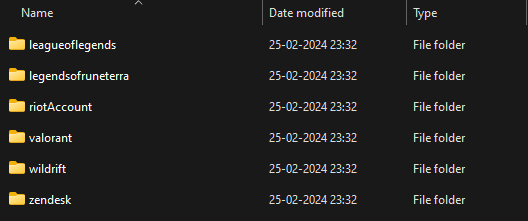
The root of the received data dump.
The interesting one is the leagueoflegends data because that's the game I played most. (I played Legends of Runeterra and Wild Rift, but only against bots and had never purchased RP, so those folders would have little to no data).
Inside the leagueoflegends folder, there are the following JSON files:
clash.json: Clash matches data.reports_grouped.json: The amount and type of misbehavior reports you've sent and received.rp_purchase_history.json: History of your RP purchases.store_transactions.json: History of all in-store purchases (champions, champion skins, ward skins, emotes, Teamfight Tactics-related purchases, etc).summoner.json: Your in-game user data (aka Summoner, an outdated term as a synonym for player).
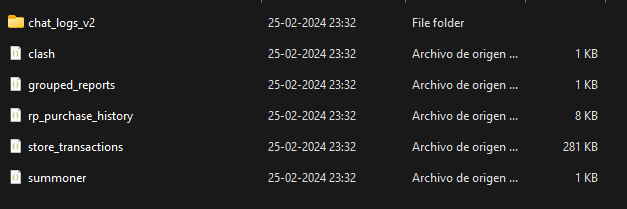
leagueoflegendsfolder structure.
As stated previously, I wanted to get my RP purchases to answer their questions. So the rp_purchase_history.json and store_transactions.json files are the ones needed for this task.
The RP Purchase History file is very simple, it follows this structure:
[{
  "amount": "8000.0", // amount of currency spent on RP
  "created": "2013-07-13 17:57:09.0", // when the transaction happened
  "currency_type": "CLP", // currency used to buy RP
  "payment_type": "DM_Card", // type of payment method
  "store_account_id": 214739, // Your LoL store ID, 1-to-1 related to your Riot Account
  "transaction_id": "LA2-4faf766c-ec20-11e2-997b-90b11c39a080", // The transaction ID
  "transaction_number": "800264997", // The correlative number of the transaction
  "user_ip": "10.11.12.13" // The public IPv4 address where this transaction was started.
}]
So long, we have the latest RP purchase question answered (just look for the most recent purchase).
But if you want to get "the latest skin given to you", that's a lot more complex as the store_transactions.json file isn't as clear as the previous one, it condenses many types of transactions into a single format:
[{
  "created": "2013-06-11 20:55:18.0", // Timestamp of the purchase,
  "id": "LA2-e59ef330-d313-11e2-997b-90b11c39a080", // ID of the purchase,
  "ip_address": "10.130.32.1", // an IP address (either yours or from inside a Riot Games server, on some entries a DNS name appear),
  "ip_balance": 71, // Your IP balance after purchase,
  "ip_delta": -4800, // How many IP/Blue Essence was spent or gained from this transaction,
  "is_refunded": null, // If this transaction was a refund one.,
  "item_id": "champions_96", // The item bought in this transaction, type and id.
  "rp_balance": 100, // Your RP balance after purchase,
  "rp_delta": 0, // How many RP was spend or gained from this transaction,
  "type": "PURCHASE" // Type of transaction, either buying something from the store, buying RP, receiving a gift, etc.
}]
Side Note: Blue Essence/IP (specified in the
ip_balanceandip_deltafields) is another in-game currency earned after playing a match and cannot be purchased.
If CS asks you about the last skin you bought they would probably have a hard time trying to understand that your last bought skin is championsskin_17014 instead of Little Devil Teemo.
While looking for answers on how to get names for Champions and Skins from item_ids, I remembered that Riot Games developed an API for League of Legends (that many game add-ons and match history sites like op.gg and Porofessor use).
Better yet, they offer a subset of endpoints inside their API called the Data Dragon which stores current and historic data about champions (including skin data!) and other in-game concepts (like Items, Summoner Spells, etc) as JSON files.
With this in hand, I decided to follow the next steps to match skin names to skin IDs:
- Download the Champion List of the current version.
- Download the Skin List for each Champion in the previous item.
- Filter the purchase data to only retrieve skins.
- Tie each bought skin to one of the elements in the skin list.
I used python==3.12, pandas==2.2.0, jupyterlab==v4.0.12 and requests==2.31.0 to process all of the above. I also used tqdm==4.66.2 to get status on the most time-consuming step (I'm impatient):
import pandas as pd
import requests
To solve the first step, I had to do the following:
championlist_raw = requests.get(
    "https://ddragon.leagueoflegends.com/cdn/14.7.1/data/en_US/champion.json"
).json()
championlist = pd.json_normalize(championlist_raw["data"].values())
This downloads the champion list from the Data Dragon API and converts it into a pandas dataframe.
After that, we have to download each champion detail file from the Data Dragon. The following can be done this way:
from itertools import chain
from tqdm.contrib.concurrent import thread_map

def champion_skin_details(champion_id):
    data = requests.get(
        (
            "https://ddragon.leagueoflegends.com/cdn/14.7.1/data/"
            f"en_US/champion/{champion_id}.json"
        )
    ).json()

    return [
        {"champion_id": champion_id, **s }
        for s in data["data"][champion_id]["skins"]
    ]

champion_skin_data = pd.json_normalize(
    chain.from_iterable(
        thread_map(
            champion_skin_details,
            championlist["id"].to_list(),
            max_workers=15
        )
    )
)
The champion_skin_details function downloads the champion data from the Data Dragon API by champion_id, then extracts the skin list of the specified champion. The champion_id parameter is just the abbreviated name of a champion (ex. Wukong, the Monkey King's champion_id is MonkeyKing) and its retrieved from the champion list downloaded previously.
The chain.from_iterable method is used to flatten the nested list of skins that will be returned and the thread_map function adds a nice loading bar inside the notebook to check the download status (takes around 20 seconds to download all champion data). Finally, the retrieved data is put inside a pandas dataframe.
After retrieving the data of all skins, we have to retrieve the purchased skins from the data dump:
import re

SKIN_ID_RE = re.compile(r"^championsskin_(\d+)$")

transactions = pd.read_json(
    "./riotdump/leagueoflegends/store_transactions.json"
)

skin_transactions = transactions[
    transactions["item_id"].str.startswith("championsskin")
].copy()


skin_transactions["skin_id"] = skin_transactions["item_id"].map(
    lambda x: SKIN_ID_RE.match(x).group(1)
)

purchased_skins = skin_transactions[["skin_id", "type", "created"]].copy()
Same as the previous step, we load the in-game store transactions inside a pandas dataframe. Next we extract all the transactions corresponding to a champion skin, specified inside the item_id as any string starting with the championsskin_ string. Afterwards we extract the numerical part of the item_id and create a new column inside the dataframe called skin_id.
Finally, we join the skins and the skin_transactions dataframes by their respective skin_id field.
purchased_skins = purchased_skins.merge(champion_skin_data,
    left_on="skin_id", right_on="id",
    how="inner", validate="many_to_one"
)
We validate the merge of the two dataframes as a many-to-one merge as there could be refunds that repeat some skin_id values in the left dataframe (purchased_skins).
The script can be modified to find other purchased items inside the League of Legends store, like champions, ward skins, Little Legends, etc. But you will have to look inside the data to retrieve the meaning of some values, there's no JSON schema for the dump files.
In the end, the resulting notebook (after some cleanup) is:
Unfortunately, my efforts were in vain as the last account ownership questionnaire I received before account deactivation didn't required any of the work done in this post.
Nevertheless, the lessons of this little experiment were the following:
- The Python/Pandas/Jupyter trio is a great and fast way to solve data gathering and analysis problems.
- Most companies (as far as I've seen) give their users a very technical and messy dump of their data when requested. Maybe because it's not a frequent request and it's (probably) not required to be sent in a human readable format.
- Please, automate all customer support requests that can be automated.
- If you automate customer support processes, don't remove the human channel for said requests, for some users any automated process is understood as hic sunt dracones.
- Rito pls fix this process. Probably they never will, most players leave their accounts inactive if they get bored.

Closing words: thanks for your time, hope you've enjoyed this story and Saludines!
-jmm